Upgrade to the latest version with
lde upgrade!
Windows C compilation out of the box
Previously, lde compile and LuaRocks packages that require a C compiler only worked reliably on Linux and macOS. On Windows, you needed a working gcc in your PATH, which meant setting up MinGW yourself.
Now lde handles that automatically. If no compiler is found on Windows, lde will download and set up MinGW for you. From there, lde compile and C-based LuaRocks packages like luasocket should just work.
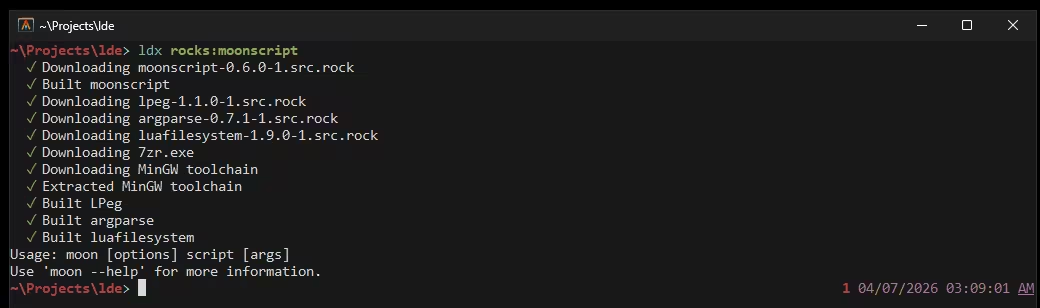
MinGW setup takes about a minute on the very first LuaRocks build, but it’s a one-time cost — lde reuses it for every build after that.
This is on a first build — MinGW setup takes about a minute, but it only happens once and will get faster over time.
Vastly improved LuaRocks support
LuaRocks support has seen a lot of work this release. More build types are handled (none, module, command), pessimistic version constraints (~>) work correctly, bin files are promoted properly, and a number of edge cases around rockspec parsing have been fixed.

That said, LuaRocks support is still not perfect. Some packages require additional tools like make that lde doesn’t ship for you yet. lde will tell you clearly when something is missing, so you know what to install.
Watch mode
lde run --watch re-runs your project whenever a file in src/ changes:
lde run --watchErrors during a re-run are printed and the watcher keeps running, so a broken edit won’t kill your session.
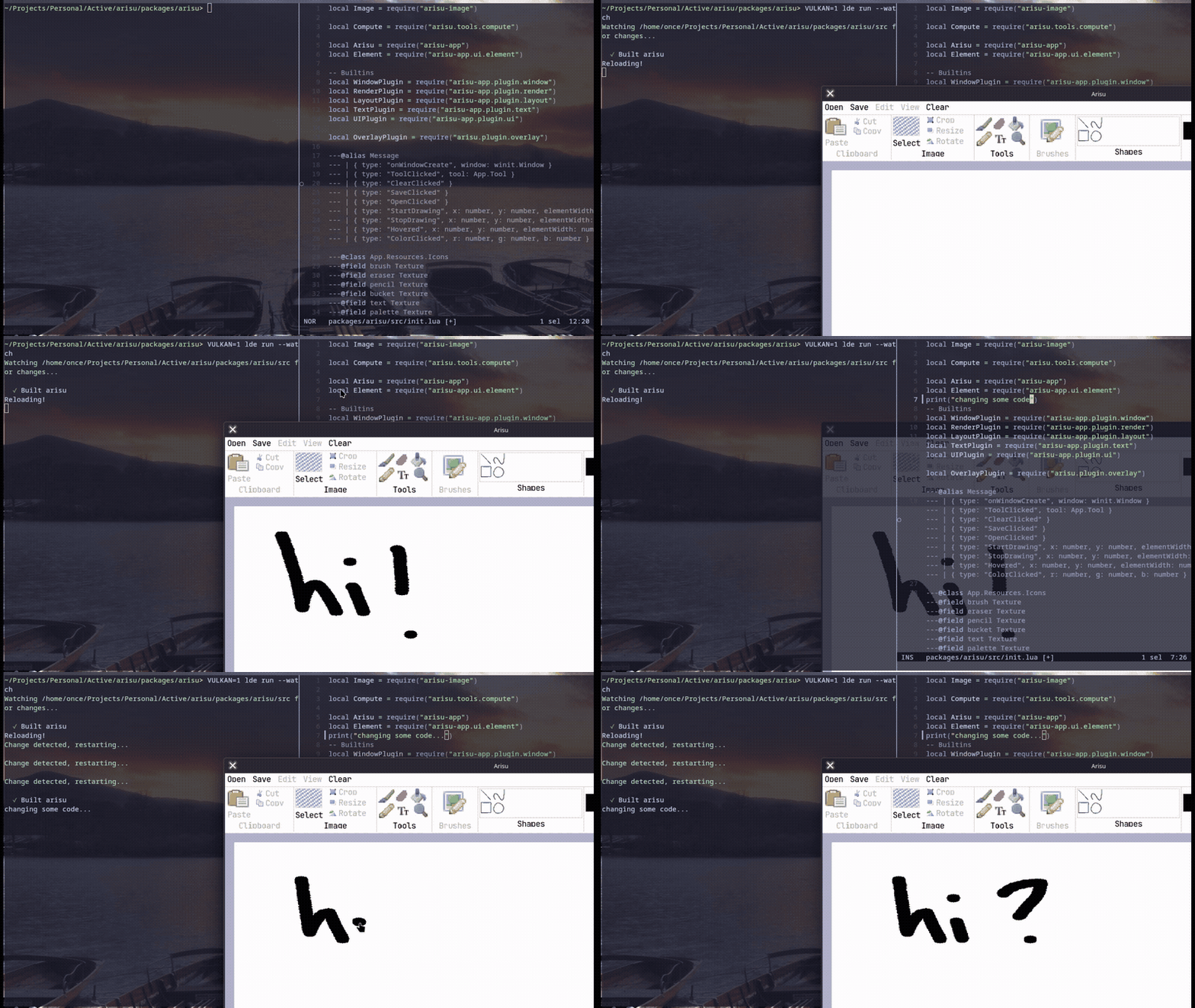
You can also pass a script name or file path:
lde run --watch myscript
lde run --watch -- script args here
JSON5 config support
lde.json now supports JSON5 syntax, so you can add comments to your config:
{
	// my project
	name: "myproject",
	dependencies: {
		hood: { git: "https://github.com/codebycruz/hood" },
	},
}
Formatting is also preserved when lde add and lde remove modify the file.
On top of that, the JSON parser has been heavily rewritten and optimized using FFI and string buffers, making it significantly faster across the board.
lde sync
lde sync is the new name for what was previously lde install (the “install all dependencies” command, like npm install). It installs everything in your lde.json into ./target/.
Most of the time you won’t need to run this manually since lde run does it for you. But it’s useful in environments where an external runtime runs your code and lde is acting purely as a package manager, like LOVE, where you’d run lde sync to populate ./target/ before it picks up the dependencies.
lde synclde install still works and will continue to be supported, but lde sync is the recommended command going forward.
macOS x86-64 support
Intel Mac support is now officially included. Previously only Apple Silicon (aarch64) was supported. The standard install script handles it automatically:
curl -fsSL https://lde.sh/install | shffi.load shim for compiled binaries
When you compile your project with lde compile, native libraries are bundled into the binary and extracted to a temp directory at runtime. However, ffi.load() calls with bare library names would previously fail to find them.
There’s now a shim that intercepts ffi.load and resolves .so files (and variants like libfoo.so or just foo) from the compiled binary’s bundled libraries. This makes a broader set of FFI-based LuaRocks packages work correctly in compiled apps.
The pattern that works across both lde run and lde compile is:
local here = debug.getinfo(1, "S").source:sub(2):match("(.*[/\\])") or ""
local sep = string.sub(package.config, 1, 1)
local libname = sep == "\\" and "curl.dll" or (jit.os == "OSX" and "libcurl.dylib" or "libcurl.so")
local lib = ffi.load(here .. libname)
During lde run, here is the source directory where the .so lives alongside the Lua file. In a compiled binary, debug.getinfo returns no useful path so here is "", and the shim resolves the bare library name from the bundled libs.
The pattern that works across both lde run and lde compile is to load the library relative to the current source file:
local here = debug.getinfo(1, "S").source:sub(2):match("(.*[/\\])") or ""
local sep = string.sub(package.config, 1, 1)
local libname = sep == "\\" and "curl.dll" or (jit.os == "OSX" and "libcurl.dylib" or "libcurl.so")
local lib = ffi.load(here .. libname)
During a normal lde run, here points to the source directory where the .so lives. In a compiled binary, the shim intercepts the call and resolves it from the bundled libraries instead.
Optional dependencies
lde now supports optional dependencies. Mark a dependency as "optional": true and it won’t be installed unless a feature that includes it is active:
"dependencies": {
  "winapi": { "git": "https://github.com/codebycruz/winapi", "optional": true },
  "luaposix": { "luarocks": "luaposix", "optional": true }
},
"features": {
  "windows": ["winapi"],
  "linux": ["luaposix"],
  "macos": ["luaposix"]
}
lde automatically activates the windows, linux, or macos feature based on the current OS. This means platform-specific dependencies like winapi or luaposix are only installed where they’re actually needed, without cluttering installs on other platforms.
Optional dependencies are tracked in the lockfile, and lde install --tree displays them clearly in the dependency tree.
Test runner: *.test.lua naming required
Tests must now be named *.test.lua to be picked up by lde test. Previously any .lua file in tests/ would run. If you have existing test files without that suffix, rename them.
Also new: test files can now require shared helpers via the special tests package:
-- tests/fixture.lua
return { makeUser = function(name) return { name = name } end }

-- tests/main.test.lua
local fixture = require("tests.fixture")
Nix flake
A Nix flake is now available for developing with lde in a Nix environment. It fetches the latest lde release into your dev shell:
nix developFixes
- rockspec: support
spec.source.branchin place ofspec.source.tag - rockspec: skip
luajitentry when resolving dependencies - rockspec: support
install.luawhile ignoring non-.luafiles - rockspec: support
nonebuild type - rockspec: support
modulebuild type, handlevariablesinmakerockspec, handle more bin path cases - rockspec: promote files in
/binto target dir to facilitate non-install.binbinaries - rockspec: support
commandbuild type - luarocks: support pessimistic version constraints (
~>) - luarocks: support sources from array table
- luarocks: hoist
makeerrors for clearer output - run: pass arguments properly when using
lde ./file - compile: support top-level dylibs being bundled
- bundle: bundle top-level Lua files in
./target - install: fix LuaRocks archive install based on
lde.lock - add: strip
rocks:prefix inlde.jsonwhen usinglde add - clap: stop parsing after
--for short flags - runtime: pass
arg[0]for scripts properly - sea: load Lua modules properly; handle Windows dynamic library embedding
- macos: pass
dynamic_lookupto use LuaJIT symbols - x: optionally consume
--to pass extra args to the invoked program - general: explicitly bail with a clear error when a package has no entrypoint
- general: explicitly exit with code 1 on internal errors
- general: more clear error when
makeis missing - general: add
--luaflag to intentionally run outside of an lde package context